100% free · editable & trackable · no limits

Free QR code for PDF

Turn a PDF into a QR code people scan to open your document — a menu, brochure, manual or price list. Swap the file anytime without a new code. Completely 100% free with no limits.

What is a PDF QR code?

A PDF QR code is a code that opens a PDF document when scanned. Instead of emailing a file or printing pages, you print one small code — on a flyer, a table, a pack — and anyone can scan it to read your menu, brochure, manual or price list on their phone. It's the easiest way to connect something printed to a document online.

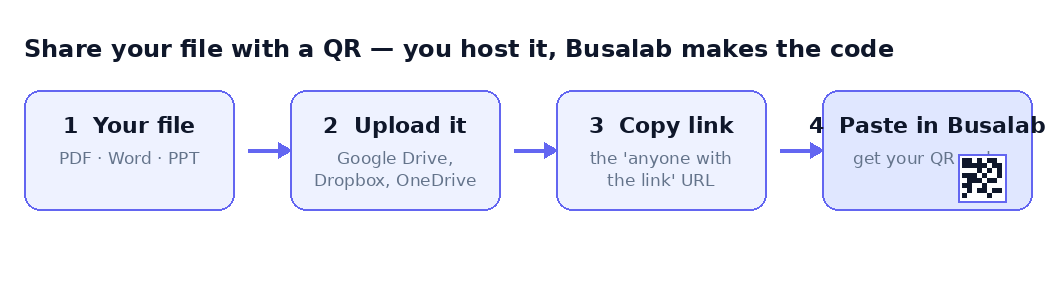
Here's how it works honestly: your PDF lives somewhere with a link — your website, Google Drive, Dropbox or similar — and the QR code points to that link. Busalab makes it a dynamic PDF QR code, so the printed code redirects through Busalab to your file, which means you can swap the PDF for a new version or point it elsewhere without reprinting, and you see every scan.

And it's completely 100% free with no limits: create as many PDF QR codes as you want, with unlimited scans and no expiry. A free PDF QR code in the real sense, with no paywall once it's printed.

How to make a QR code for a PDF

Free, no sign-up tricks, ready in minutes.

1

Host your PDF

Upload it to your site, Google Drive or Dropbox and copy the link.

2

Paste the link & brand it

Add the link to Busalab, set your colours and logo, and customise.

3

Download & print

Export as PNG, SVG or print-ready PDF — and swap the file anytime.

Get started free →

Ways to use a PDF QR code

📋

Menus

A QR code for a PDF menu on the table, updated without reprinting.

📖

Brochures

Link a printed flyer to a full brochure PDF in one scan.

🛠️

Manuals

A code on a product that opens the instruction PDF.

🏷️

Price lists

Share an up-to-date price list PDF you can swap anytime.

🎟️

Event programs

A code on signage that opens the event program PDF.

📄

Resumes & docs

A QR code on your CV or one-pager that opens the full PDF.

Why a Busalab PDF QR code

Swap the PDF anytime

Point the code at a new version — the printed code keeps working.

Track every open

See how many people scan to read your PDF, when and where.

100% free, no limits

Unlimited PDF QR codes and scans, no expiry, no credit card.

Works with any host

Your website, Google Drive or Dropbox — paste the link.

On-brand & print-ready

Add your colours and logo, download PNG, SVG or PDF.

No app to scan

Any modern phone camera opens the document — nothing to install.

How a PDF QR code works

A QR code can't hold a whole document inside it, so the reliable way to make a QR code for a PDF is to host the file and point the code at its link. Most people already have somewhere to put it — a page on their website, a shared Google Drive or Dropbox link. Paste that link into Busalab and you've turned a PDF into a QR code in seconds.

If you used a basic tool, the link would be baked in and fixed forever. Because Busalab's is dynamic, the qr code link to pdf can be repointed later — to an updated file or a different document — and every scan is tracked, which a static code can't do.

How to make a QR code for a PDF

First, get your PDF online: upload it to your website, Google Drive or Dropbox and copy its shareable link. Then paste that link into Busalab to create a QR code for a PDF — add your colours and logo, and download it. That's all it takes to generate a QR code for a PDF that's ready to print.

Download it as a PNG or SVG for design tools, or a print-ready PDF for posters and packaging. Wondering how to make a QR code for a PDF document at scale? Make a QR code for a PDF per file and manage them all from one dashboard.

Update the PDF without reprinting the code

This is the advantage of a dynamic code. Print a code that opens this season's menu or this year's catalogue, and when the document changes, point the same code at the new file — no reprint. To turn a PDF into a QR code once and keep it current, you just update the link it leads to.

It's ideal for anything that gets revised: menus, manuals, price lists and brochures that you print once but update often.

Free, unlimited and trackable

Every code is free to create, host and update, with unlimited scans and no expiry. Whether you need a quick qr code for pdf file links, a branded brochure code, or a free QR code generator for PDF documents across a catalogue, it's the same free tool — and every scan is counted so you can see what gets read.

Whether you call it a pdf to qr code generator, a way to link pdf to qr code, or simply a qr code for pdf free of charge, this is it — no watermark and no cap. Use it as a free QR code generator PDF tool: create QR code for PDF, generate QR code for PDF, and make a QR code for PDF document files — a PDF QR code free of charge, with every QR PDF you need.
Frequently asked questions

How do I make a QR code for a PDF?
Host your PDF (your website, Google Drive or Dropbox), copy its link, paste it into Busalab, then customise and download the code. It's dynamic, so you can swap the file later.
Does Busalab host the PDF file?
No — your PDF lives where you host it (your site, Google Drive, Dropbox) and the code links to it. That keeps the code fast and free, and lets you update the file anytime.
Can I change the PDF after printing the code?
Yes. The code points to Busalab, so you can repoint it to a new version of the PDF and the same printed code keeps working.
Is the PDF QR code free?
Yes — completely 100% free with no limits. Create unlimited PDF QR codes with unlimited scans, no expiry and no credit card.
Can I see how many people open my PDF?
Yes. Every PDF QR code includes free scan analytics: total scans over time, country and device.
Create your free QR code →

More free QR code tools

Dynamic QR code generatorURL / link QR codeMenu QR code